
Reversing Treadmill Bluetooth - Sending Data
This is part of a few posts on trying to understand my treadmill’s Bluetooth.
Our Treadmill ‘Hello World’
Enough wild guessing, how do we test this? Remember, one of us (me) has minimal
Bluetooth knowledge, so we aren’t going to be shackled by ‘hard-won knowledge’
and ‘best practices’. Let’s just do some quick searching for linux bluetooth
and try to find the simplest way to send Bluetooth LE packets.
Setting up gatttool
I’ll spare you (side note: who will ever read this?) an overview of Bluetooth
LE/GATT/etc. - there are plenty of other much better resources for that. To make
it brief, gatttool seems to be popular (and
deprecated
?),
and after a quite a bit of bumbling around, we can do some stuff!
We can start an interactive session with:
$ gatttool -b <treadmill MAC> -I -t random
The -t random came from the comments
here
.
Unfortunately I couldn’t find a clear (to me) explanation for what it means - it
sets the LE address to random per the docs, but nothing about why that is needed
(I assume it means it is randomizing the address of the client when connecting,
which may mean there is different behavior when providing a constant address?).
We could dig into the code itself, but that doesn’t feel useful.
Starting with the basics, we can connect and list the services (primary):
$ gatttool -b <MAC> -I -t random
[MAC][LE]> connect
Attempting to connect to MAC
Connection successful
[MAC][LE]> primary
attr handle: 0x0001, end grp handle: 0x0007 uuid: 00001800-0000-1000-8000-00805f9b34fb
attr handle: 0x0008, end grp handle: 0x0008 uuid: 00001801-0000-1000-8000-00805f9b34fb
attr handle: 0x0009, end grp handle: 0x000e uuid: 00001533-1412-efde-1523-785feabcd123
attr handle: 0x000f, end grp handle: 0x0016 uuid: 00001530-1212-efde-1523-785feabcd123
attr handle: 0x0017, end grp handle: 0xffff uuid: 00001400-555e-e99c-e511-f9f4f8daeb24
From the packet capture, we know that:
-
The treadmill is sending values back on handle
0x000b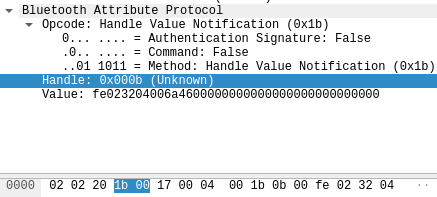
-
The phone is sending commands on handle
0x000e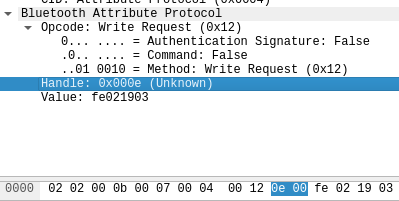
Based on the handle ranges from the primary command, this is from service
00001533-1412-efde-1523-785feabcd123. Let’s inspect all of the
characteristics in that service:
[MAC][LE]> characteristics 0x0009 0x000e
handle: 0x000a, char properties: 0x12, char value handle: 0x000b, uuid: 00001535-1412-efde-1523-785feabcd123
handle: 0x000d, char properties: 0x0a, char value handle: 0x000e, uuid: 00001534-1412-efde-1523-785feabcd123
Per this
O’Reilly
article
we know that a Client Characteristic Configuration Descriptor allows us to
enable/disable server-initiated updates and has a standard UUID of 2902 (plus
the standard trailing 16 bits, see
here
).
Let’s see if one is sitting within our service:
[MAC][LE]> char-read-uuid 2902
handle: 0x000c 	 value: 03 00
handle: 0x0014 	 value: 03 00
handle: 0x001c 	 value: 03 00
handle: 0x0021 	 value: 03 00
0x000c fits the bill, and if we look back at the very first packet in our
phone->treadmill conversation, we can see it is writing the value 0x0100 to
that handle:
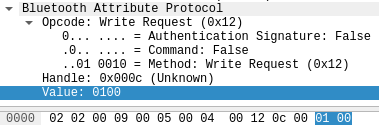
That makes sense - this is the phone telling the treadmill to subscribe to
notifications, and based on the characteristics above / the Example
service from the O’Reilly docs, these notifications must be for handle
0x000b. From this we can assume that those 0x000b values probably contain
the treadmill state, but we’ll get to that later.
Replaying a session
We have a general feel for the service, so let’s wrap this up with a test - can we actually use this to write a value? Let’s see if we can send the two packets that increased the speed to 1.0:
fe020d02 ff0d020402090409020101a00000b10000000000
Remember how our capture had a lot of chatter at the beginning, prior to the commands being sent? It looked like this:
0100
fe020d02 ff0d020402090409020101c10000d20000000000
fe020802 ff08020402040204818700000000000000000000
fe020802 ff08020402040404808800000000000000000000
fe020802 ff08020402040404889000000000000000000000
fe020a02 ff0a0204020602068200008a0000000000000000
fe020a02 ff0a0204020602068400008c0000000000000000
fe020802 ff08020402040204959b00000000000000000000
fe022c04 0012020402280428900701cec4b0aaa2a8949696 0112aca8a2bad0dccefe14003a52786486a6fc18 ff08324aa0880200004400000000000000000000
fe021903 001202040215041502000f001000d81c480000e0 ff070000001000086e0000000000000000000000
fe021903 0012020402150415020e00000000000000000000 ff070000001001003a0000000000000000000000
fe021703 0012020402130413020c00000000000000000000 ff0500800000a500000000000000000000000000
fe021703 0012020402130413020c00000000000000000000 ff0500800000a500000000000000000000000000
fe021703 0012020402130413020c00000000000000000000 ff0500800000a500000000000000000000000000
fe021703 0012020402130413020c00000000000000000000 ff0500800000a500000000000000000000000000
fe022c04 0012020402280428900701cec4b0aaa2a8949696 0112aca8a2bad0dccefe14003a52786486a6fc18 ff08324aa0880200004400000000000000000000
fe022003 00120204021c041c020900004002184000008030 ff0e2a0000c720580200b400580200ee00000000
Rather than trying to understand what this does, let’s take a shortcut - let’s just connect and replay the entire session of phone->treadmill packets. We’ll do this because if we can successfully replay the session:
- We don’t actually need to understand the beginning pieces - we can just repeat them whenever we start a connection
- We can add/remove sequences and see what breaks
How do we do this? Manually typing is out for two reasons:
- I don’t want to type everything manually
- Even if I did, I can’t type fast enough - the connection drops after ~10
seconds of not receiving
something, so we’d need to constantly sendsomethingwhile also sending commands
We already have all of the packets, and gatttool allows for writing values
within an interactive session:
char-write-req 0x000e fe020d02
char-write-req 0x000e ff0d020402090409020101c10000d20000000000
So one hacky way comes to mind:
- Hook up the
stdinofgatttoolto a Unix socket - Write a shell script that writes the commands to the socket
This would solve both problems - no need to type manually and should be fast enough to keep the session alive. There are probably simpler ways, but I don’t do a lot of socket-related stuff so this should be a fun experiment (fun/enjoyable are top priorities - if we were doing this whole thing for practical reasons we’d just buy the app).
Set up the sockets
We’ll use nc to set up the socket. -l + /tmp/treadmill.sock will create a
/tmp/treadmill.sock socket and listen for connections. -k keeps the session
alive (since we want to keep sending commands).
$ nc -lkU /tmp/treadmill.sock | gatttool -b <MAC> -I -t random
Now we can communicate with the socket:
$ echo "connect" | nc -U /tmp/treadmill.sock -N
Where -N means ‘Shut down after EOF on the input’. We need this because the
socket is kept open for gatttool, and our echo command will run but then
wait forever for a response. Now, let’s put together a simple shell script that sends commands to the socket, something like:
echo "connect" | nc -U /tmp/treadmill.sock -N
# Give it time to connect.
sleep 2

echo "char-write-req 0x000e fe020d02" | nc -U /tmp/treadmill.sock -N
echo "char-write-req 0x000e ff0d020402090409020101c10000d20000000000" | nc -U /tmp/treadmill.sock -N
echo "char-write-req 0x000e fe020802" | nc -U /tmp/treadmill.sock -N
echo "char-write-req 0x000e ff08020402040204818700000000000000000000" | nc -U /tmp/treadmill.sock -N
echo "char-write-req 0x000e fe020802" | nc -U /tmp/treadmill.sock -N
echo "char-write-req 0x000e ff08020402040404808800000000000000000000" | nc -U /tmp/treadmill.sock -N
echo "char-write-req 0x000e fe020802" | nc -U /tmp/treadmill.sock -N
echo "char-write-req 0x000e ff08020402040404889000000000000000000000" | nc -U /tmp/treadmill.sock -N
echo "char-write-req 0x000e fe020a02" | nc -U /tmp/treadmill.sock -N
echo "char-write-req 0x000e ff0a0204020602068200008a0000000000000000" | nc -U /tmp/treadmill.sock -N
echo "char-write-req 0x000e fe020a02"  | nc -U /tmp/treadmill.sock -N
echo "char-write-req 0x000e ff0a0204020602068400008c0000000000000000" | nc -U /tmp/treadmill.sock -N
Not the prettiest, but…it works?? Madness! However this surfaces something interesting: we are pumping these commands through with zero delay, and although it works, there is significant lag. For example, the above script completes but the changes only register about five seconds later. One explanation - the treadmill buffers packets and uses some internal logic to determine when to apply them. Seems reasonable - this probably helps ensure that random state changes can’t inadvertently damage the treadmill itself.
Simple enough - we can drop a sleep in between commands (which we can now
identify based on our analysis). The result is a rough simulation of our
completely non-scientific sample.
Using socat
Another fun way to do this is socat. There is a
great
post
on the various ways
to use socat, and borrowing from that we can do:
$ socat -u OPEN:/tmp/commands.txt UNIX-CONNECT:/tmp/treadmill.sock
That will open socat in unidirectional mode (-u) and write each line of the
file to our socket. This also works, but runs into the same issue we hit above
(commands are issued in rapid succession). Since we want to inject some
higher-level control flow (sleeps, logging, etc.), we’ll use the simple
approach above, but always fun to explore options.
Tweaking the inputs
To wrap this up, let’s put our analysis to a not-very-rigorous test. Rather than replay the original session’s commands, let’s try to set the speed/incline to values we did not observe. In increments of 1.0, let’s try:
- Changing the speed from 5.0 to 8.0 (and back)
- Changing the incline from 3.0 to 5.0 (and back)
If our theorems are correct, the command should be:
fe020d02 ff 0d 02 04 02 09 04 09 02 01 01 25 03 00 ?? 0000000000
This is because:
- 5.0 MPH == 8.05 KPH
- 8.05 KPH == 805 in treadmill speak
hex(805) == 0x325- Treadmill is little-endian ->
2503
Why the ??’s? Recall that we didn’t figure out
what those values meant, but they were always 0x10 higher than the low byte.
However we never took a measurement where the value was two bytes, so unclear
what the behavior should be. It certainly means something, but will it still
work if we ignore it? Let’s see!
# Increase the speed to 5.0
echo char-write-req 0x000e fe020d02 | nc -U /tmp/treadmill.sock -N
echo char-write-req 0x000e ff0d020402090409020101250300000000000000 | nc -U /tmp/treadmill.sock -N
…and it works! Not knowing what that final byte means is a little annoying,
but it looks like we don’t actually need it for our case. Repeating the same
pattern and throwing a sleep 1 in between each one confirms that we’re on the
right track. We can play this off like ‘Yes yes, naturally this works, it is
simply trivial’, but between the two of us, this was more than a little
satisfying.
Oh and if not knowing what the final byte means isn’t annoying enough, it still works if we remove everything in between the notification subscription and the first command except this:
echo char-write-req 0x000e fe022c04 | nc -U /tmp/treadmill.sock -N
echo char-write-req 0x000e 0012020402280428900701cec4b0aaa2a8949696 | nc -U /tmp/treadmill.sock -N
echo char-write-req 0x000e 0112aca8a2bad0dccefe14003a52786486a6fc18 | nc -U /tmp/treadmill.sock -N
echo char-write-req 0x000e ff08324aa0880200004400000000000000000000 | nc -U /tmp/treadmill.sock -N
For posterity, here is the final test script:
# Start a socket with and connect to gatttool:
#
#   nc -lkU /tmp/treadmill.sock | gatttool -I -t random -b MAC
#
# Then run this.
echo "**** NordicTrack T6.5S Test Program ****"

echo -n "Connecting..."
echo connect | nc -U /tmp/treadmill.sock -N
sleep 2
# Yeah yeah, this doesn't check whether the connection succeeded, lay off.
echo "done"

# Subscribe to notifications.
echo -n "Subscribing to notifications..."
echo char-write-req 0x000C 0100 | nc -U /tmp/treadmill.sock -N
echo "done"

# Unclear what this is, but it is required for the rest to work.
echo -n "Writing magic incantation..."
echo char-write-req 0x000e fe022c04 | nc -U /tmp/treadmill.sock -N
echo char-write-req 0x000e 0012020402280428900701cec4b0aaa2a8949696 | nc -U /tmp/treadmill.sock -N
echo char-write-req 0x000e 0112aca8a2bad0dccefe14003a52786486a6fc18 | nc -U /tmp/treadmill.sock -N
echo char-write-req 0x000e ff08324aa0880200004400000000000000000000 | nc -U /tmp/treadmill.sock -N
sleep 4
echo "done"

echo
echo "Starting test program"
echo

# End at 1.0 since it is annoying leaving it at 5.0.
echo -n "Speed 5.0 -> 8.0 -> 5.0 -> 1.0..."
for speed in "2503" "c003" "6704" "0705" "6704" "c003" "2503" "a0"; do
  echo char-write-req 0x000e fe020d02 | nc -U /tmp/treadmill.sock -N
  echo char-write-req 0x000e ff0d020402090409020101${speed}00000000000000 | nc -U /tmp/treadmill.sock -N
  sleep 2
done
echo "done"

echo -n "Incline 3.0 -> 5.0 -> 3.0..."
for incline in "2c01" "9001" "f401" "9001" "2c01"; do
  echo char-write-req 0x000e fe020d02 | nc -U /tmp/treadmill.sock -N
  echo char-write-req 0x000e ff0d020402090409020102${incline}00000000000000 | nc -U /tmp/treadmill.sock -N
  # Give it some time to settle.
  sleep 4
done
echo "done"
Next up, let’s jump back to analysis and figure out how to get/interpret the current state of the treadmill.